Run the Business
Enter it once. Let it go where it needs to.
Quotes, invoices, job sheets and forms connected so the same details aren’t typed three times.
The admin that eats your evenings
“Customer details go in the quote. Then the invoice. Then the job sheet. Then the calendar. Four times, by hand, usually at night, and one of them’s got a typo.”
If that sounds familiar, this is the system that fixes it. Here is exactly how it works.
What is included
What you get
How it works
The workflow, step by step
An enquiry comes in from form, email or AI receptionist
Quote generated from the enquiry record — no retyping
Accepted quote automatically creates the invoice and the job
You review the final invoice before it sends, and mark the job done when the work is complete
Reminders on unpaid invoices sent automatically
Example in practice
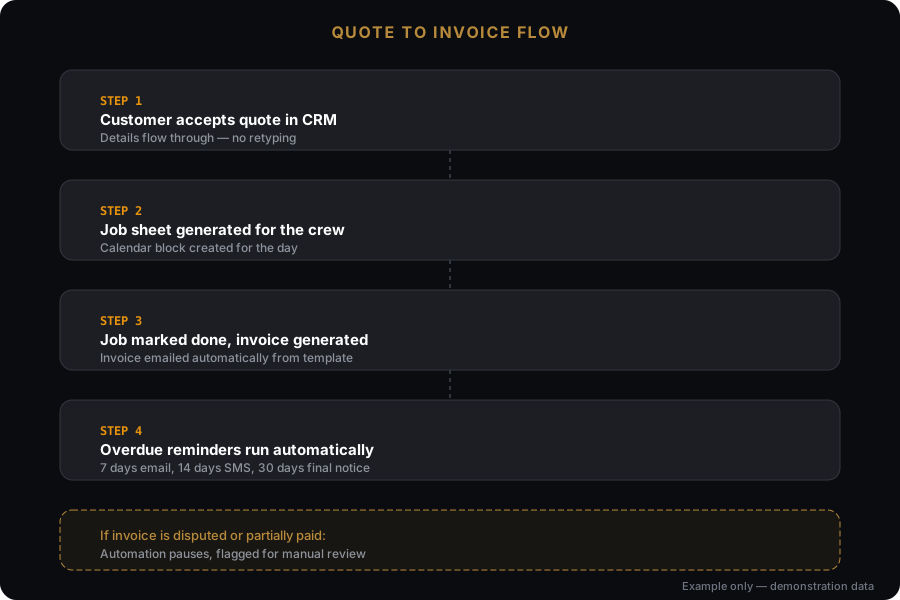
Made-up example. The real one gets built around your business.
What automation won’t fix
- Some older trade software has no way to connect to anything. If yours is one of them, we’ll tell you during the free preview or enquiry-system review rather than after you’ve paid, and sometimes the answer is to change software.
- It doesn’t remove the need for someone to own the process.
- It won’t fix a process that’s a mess before we automate it. Automating a mess gives you a faster mess.
What it connects to
Software it works with
Stated honestly: native means we connect directly. Via Make or Zapier means an automation layer sits between. Via API means a custom connection. We will never claim a native integration that has not been built.
Pricing
Scoped build $590 one-off. Ongoing support $99/month. Complex multi-system builds quoted after the free preview or enquiry-system review. Priced by workflow, not by hour. “Quote goes out, follow-up runs, accepted quote creates an invoice and a job” is one workflow, quoted as one thing.
What changes the quote
- Number of workflows
- Number of tools to connect
- Custom templates vs standard
- Ongoing support and changes
All prices in AUD, excluding GST. SMS, ad spend and third-party software are charged at cost and confirmed in writing before any work begins.
FAQ
Questions about Quote, Invoice, Form & Admin Automation
What’s worth automating first?
What if my software doesn’t connect?
What happens when a step fails?
Does this replace Xero or ServiceM8?
Can you connect to my older trade software?
What goes with this
What usually goes with this
Pairs with the CRM. One holds the customer, the other turns them into an invoice.
Ready to fix this?
Tell me about your setup and I’ll tell you whether Quote, Invoice, Form & Admin Automation is the right first move.