Follow Up and Book
One list. New, quoted, booked, done.
Every enquiry from every channel in one place, with an obvious next action on each one.
Where the leads actually end up
“Leads live in four places — your phone, your inbox, a notebook in the ute, and your head. Nobody can tell you how many quotes are outstanding or which ones have gone quiet.”
If that sounds familiar, this is the system that fixes it. Here is exactly how it works.
What is included
What you get
How it works
The workflow, step by step
A new enquiry arrives from phone, website, chat or social
Lead auto-logged in the pipeline with source and date
Stage moves automatically: New to Contacted to Quoted to Follow-up due to Booked to Done
You check the pipeline each morning and call back the leads that need a human touch
Review request triggered when job is marked Done
Example in practice
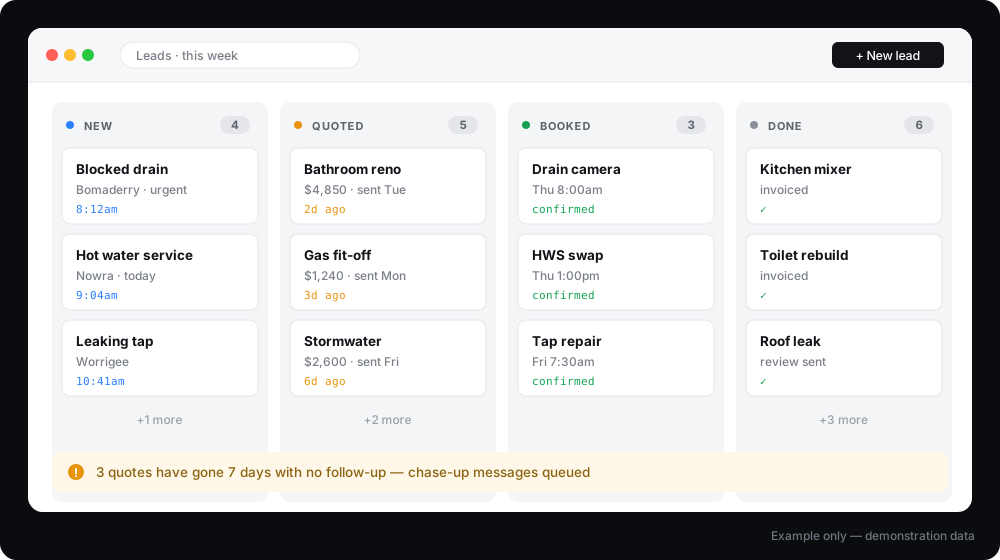
Made-up example. The real one gets built around your business.
What a CRM won’t fix
- It won’t fix a pipeline nobody updates, because this is the one that fails most often and it fails for that reason — if nobody’s going to touch it, don’t buy it.
- It doesn’t replace job-management software like ServiceM8 or Simpro. It sits in front of them.
- Migrating messy data takes longer than people expect.
What it connects to
Software it works with
Stated honestly: native means we connect directly. Via Make or Zapier means an automation layer sits between. Via API means a custom connection. We will never claim a native integration that has not been built.
Pricing
Build and migration $690 one-off. Ongoing support $99/month. The training session is included in the build. A CRM nobody updates is worse than a spreadsheet. The handover is the difference.
What changes the quote
- Number of lead sources to connect
- Custom pipeline stages vs standard
- CRM migration from spreadsheets
- Ongoing support and changes
All prices in AUD, excluding GST. SMS, ad spend and third-party software are charged at cost and confirmed in writing before any work begins.
FAQ
Questions about CRM & Lead-Pipeline Automation
Do I need a CRM already?
Can you migrate my spreadsheet?
Who keeps it up to date day to day?
What if I already have one nobody uses?
Does this replace ServiceM8 or SimPRO?
How long does migration take?
What happens to my data if I cancel?
What goes with this
What usually goes with this
If you’re putting everything in one list, the follow-up system is what makes that list work — it chases the leads so you don’t have to remember to.
Ready to fix this?
Tell me about your setup and I’ll tell you whether CRM & Lead-Pipeline Automation is the right first move.