Follow Up and Book
Fewer empty slots, less time on the phone.
Customers book themselves, get reminded, and confirm with one tap, and the ones who can’t make it tell you in advance instead of not showing.
The no-show problem
“A no-show is the worst kind of lost money. The slot’s gone, you’ve already turned someone else away, and you find out when they don’t turn up.”
“Six no-shows a month at $95 a session is $570. That’s the whole cost of fixing it, several times over.”
If that sounds familiar, this is the system that fixes it. Here is exactly how it works.
What is included
What you get
How it works
The workflow, step by step
Customer books themselves through your site
Instant confirmation with the details
Reminders at 48 hours, 24 hours and a couple of hours before
You see the cancellation in real time and decide whether to fill the slot from the waitlist
Post-appointment follow-up and review request sent
Example in practice
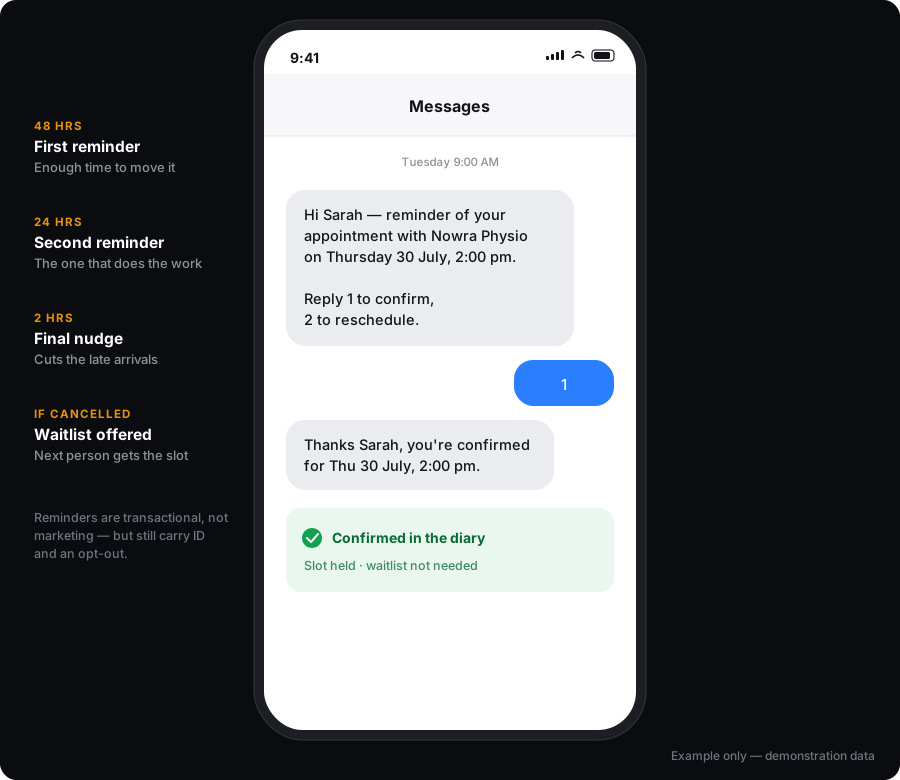
Made-up example. The real one gets built around your business.
What reminders won’t stop
- We won’t quote you a percentage reduction in no-shows. You’ll see claims of 60–80% around this category. They’re other people’s marketing. Reminder sequences reduce no-shows; how much depends on your customers and your timing.
- It doesn’t stop someone who was never going to turn up. It gives them an easy way to tell you.
- SMS charged at cost on top.
On compliance
Appointment reminders are generally treated as transactional rather than marketing, which puts them on a different footing to promotional messages, but they still need clear business identification and a working opt-out. We set both up as standard.
On the DIY cost
Most businesses assembling this themselves pay $125 to $300 a month in tools alone — booking software, an SMS platform, a review tool and a recall system. This is managed on top of whichever tools suit you.
SMS sender ID registration
Since 1 July 2026, alphanumeric sender IDs used to text Australian mobile numbers must be registered on the ACMA SMS Sender ID Register. This applies to reminder and confirmation texts, not just marketing — appointment reminders are transactional, but the sender ID requirement covers them regardless. If you want your business name showing as the sender rather than a number, that sender ID now has to be registered. We’ll handle the registration through your provider as part of setup. Unregistered sender IDs get shown as “Unverified” or may be blocked by carriers. We can’t guarantee a registration will be approved.
What it connects to
Software it works with
Stated honestly: native means we connect directly. Via Make or Zapier means an automation layer sits between. Via API means a custom connection. We will never claim a native integration that has not been built.
Pricing
Setup from $390. Managed service $99/month. SMS charged separately at provider cost. Reminder sequences reduce no-shows; how much depends on your patients and your timing. A physio at $95 a session with six no-shows a month is losing $570.
What changes the quote
- Booking tool integration complexity
- Number of reminder touches
- Monthly message volume
- Rescheduling and rebooking flows
All prices in AUD, excluding GST. SMS, ad spend and third-party software are charged at cost and confirmed in writing before any work begins.
FAQ
Questions about Online Booking, Reminders & No-Show Automation
Does it work with my existing booking system?
When should reminders go out?
Can I take deposits?
What about the waitlist?
How much does SMS cost?
What if my booking system isn’t on your list?
What goes with this
What usually goes with this
Most people who fix their no-shows also want the review system. One fills the gaps, the other builds the reputation.
Review Generation & Reputation Management
Automatic review requests after the job, responses handled, and everything in one place instead of four platforms — set and forget, with alerts on anything negative.
ExploreAI Receptionists & Voice Agents
A managed AI receptionist built around your services, your hours, your qualifying questions and your rules about when a person takes over.
ExploreReady to fix this?
Tell me about your setup and I’ll tell you whether Online Booking, Reminders & No-Show Automation is the right first move.