Answer and Capture
Every call answered. Every job written down.
A managed AI receptionist built around your services, your hours, your qualifying questions and your rules about when a person takes over.
What the phone is actually costing you
“The phone goes while you’re under a house, driving, or already talking to someone. It rings out. They don’t leave a message — almost nobody does. They ring the next number on Google, and by the time you see the missed call at two o’clock, it’s gone.”
If that sounds familiar, this is the system that fixes it. Here is exactly how it works.
What is included
What you get
How it works
The workflow, step by step
A call comes in while you’re on the tools or driving
Greeting, then job type, suburb, urgency, access and contact number confirmed
Books it, takes a message, or transfers based on your rules
You read the summary and decide whether to call back straight away or let the system handle it
Lead added to your pipeline with all details
Example in practice
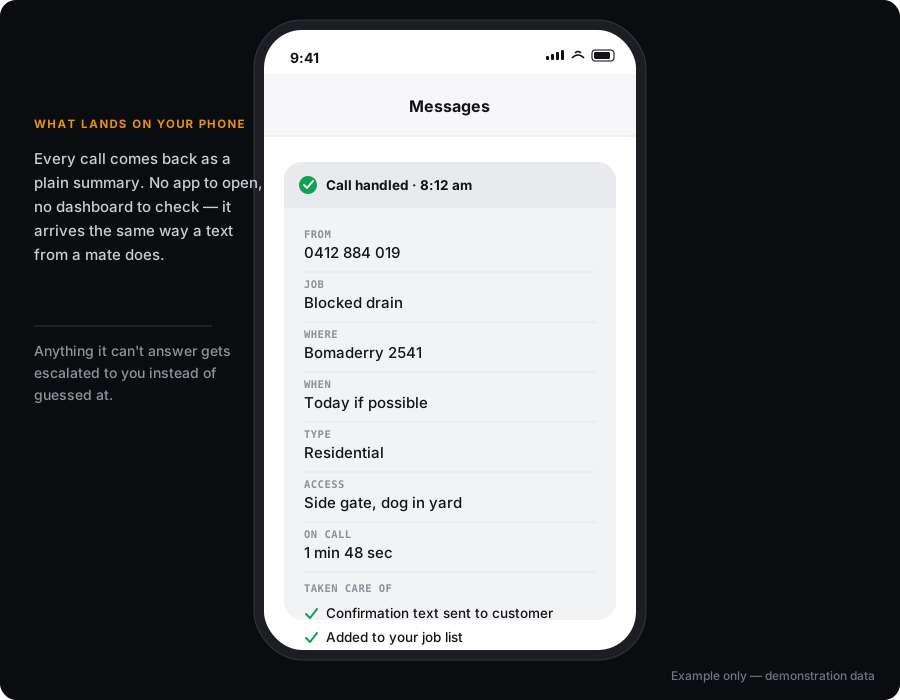
Made-up example. The real one gets built around your business.
What it won’t handle
- It won’t improvise answers outside the information you’ve approved. If it doesn’t know, it says so and takes a message.
- It won’t quote a price or commit to a time unless you’ve told it to.
- It won’t handle every unusual situation. Complaints, safety issues and anything involving money above your published ranges go to you.
- It should never be the only path for a customer in genuine distress.
About the cheap options
There are flat-rate services at a lower monthly price with unlimited minutes. They give you a generic receptionist that works fine for straightforward businesses. This is configured around your services, your suburbs, your qualifying questions and your escalation rules, then tested against real scenarios before it ever answers a customer. If the generic one suits you better, use it. You’ll save money and we’d rather tell you that now.
SMS sender ID registration
Since 1 July 2026, alphanumeric sender IDs used to text Australian mobile numbers must be registered on the ACMA SMS Sender ID Register. This applies to confirmation texts this system sends — not just marketing. If you want your business name showing as the sender rather than a number, that sender ID now has to be registered. We’ll handle the registration through your provider as part of setup. Unregistered sender IDs get shown as “Unverified” or may be blocked by carriers. We can’t guarantee a registration will be approved — that’s the provider’s and ACMA’s call, not ours.
What it connects to
Software it works with
Stated honestly: native means we connect directly. Via Make or Zapier means an automation layer sits between. Via API means a custom connection. We will never claim a native integration that has not been built.
Pricing
Three tiers, one product.
Simple Reception
Setup from $290 · From $199/month · includes up to 40 answered calls
Answers calls, handles your common questions, collects job, suburb and contact details, simple routing, and sends you a written call summary.
Booking & Workflow Reception
Setup from $690 · From $349/month · includes up to 100 answered calls
Everything above plus calendar booking, changes and cancellations, qualifying questions, writing the enquiry into your CRM, and business rules about who gets what.
Advanced Front Office
Setup from $1,900 · From $749/month · includes up to 300 answered calls
Multiple locations or departments, custom API integrations, complex escalation, outbound follow-up on approved lists, call-quality review and ongoing tuning.
All prices in AUD, excluding GST. SMS, ad spend and third-party software are charged at cost and confirmed in writing before any work begins.
CALL CHARGES
How the call charges work.
Most services make this impossible to work out in advance. Ours doesn’t.
- Each plan includes a set number of answered calls a month
- Additional answered calls are from $2 each
- That covers the call itself — there is no separate per-minute telephony charge and no minute counting
- Texts the system sends are charged separately at provider cost
Worked example — not a quote
AI receptionist, Simple: from $199/month, including up to 40 answered calls.
Say the business takes about 60 calls in a month. That’s 20 extra answered calls, from $2 each — about $40. So roughly $239 for the month.
Your expected figure is confirmed in writing before launch. Every figure carries “from” or “up to”.
WHY IT’S NOT A PHONE MENU
It’s a conversation, not a menu.
It’s not a phone menu. Nobody presses 1 for accounts. The caller says what they need in their own words — “I’ve got a blocked drain in Bomaderry” — and the system picks up the job, the suburb and the urgency from that.
WHAT MANAGED COVERS
What you’re paying for month to month.
Substantial new functionality — a new integration, a second location, a rebuilt call flow — is quoted separately. We don’t promise unlimited changes, optimisation or support.
IT LEARNS YOUR LANGUAGE
Your words, not a dictionary’s.
It’s configured with your service names, your suburbs, the way you describe jobs, and your pricing language, so it doesn’t mangle terms your customers use.
WHERE YOUR DATA GOES
Plain about data.
Calls are handled by a telephony provider and an AI voice service. Recordings and transcripts are only created if you enable them. Some providers process data outside Australia. We’ll tell you which providers your build uses.
FAQ
Questions about AI Receptionists & Voice Agents
What does the caller hear first?
Does it work with ServiceM8 or Simpro?
What if two calls come at once?
After hours and public holidays?
Are calls recorded?
What’s in a call summary?
Will it sound like a robot?
What happens when it doesn’t know the answer?
Can a person take over mid-call?
Can I keep my existing number?
How many calls are included before I pay extra?
Do I get charged per minute?
Can it book into my system?
What happens if I cancel?
What happens to my calls if your system goes down?
Why not just buy the software myself?
Can it transfer urgent calls to me but take a message for everything else?
What happens if it mishears an address or a name?
How long does it take to set up?
What goes with this
What usually goes with this
If you’re answering calls with this, you’ll want the CRM behind it so nothing slips through.
Missed-Call Text-Back Automation
The cheapest system we build and the one most likely to pay for itself in week one — a text goes out within seconds of a missed call, captures the reply, and turns a lost lead into a callback.
ExploreCRM & Lead-Pipeline Automation
Every enquiry from every channel in one place, with an obvious next action on each one.
ExploreOnline Booking, Reminders & No-Show Automation
Customers book themselves, get reminded, and confirm with one tap, and the ones who can’t make it tell you in advance instead of not showing.
ExploreRelated guides
Read before you decide
Can an AI Receptionist Book Into ServiceM8, SimPRO or AroFlo?
What ServiceM8, SimPRO and AroFlo actually expose, what "booking into" means, what happens with incomplete details, where a person takes over, and what changes the build cost.
How Much Does an AI Receptionist Cost in Australia?
The three cost layers that catch people out — setup, monthly management and call usage — our published prices, how they compare to the market, and what to ask any provider.
AI Receptionist vs Virtual Receptionist vs Voicemail
Honest comparison of all three — who each genuinely suits, including when a human service or good voicemail is the better answer. Disclosure: we sell AI reception.
Ready to fix this?
Tell me about your call flow and I’ll tell you whether an AI receptionist fits.